<?xml version="1.0" encoding="UTF-8"?>
<?xml-stylesheet type="text/xsl" href="/rss/atom-styles.xsl"?>
<feed xmlns="http://www.w3.org/2005/Atom">
  <title>Marlon König</title>
  <subtitle>Marlon König writes about the Microsoft Power Platform: Copilot Studio, Power Apps, Power Automate and Governance. Hands-on insights into what works, what doesn&#039;t, and how to get more out of these tools.</subtitle>
  <link href="https://marlon-koenig.com//atom.xml" rel="self" type="application/atom+xml"/>
  <link href="https://marlon-koenig.com/" rel="alternate" type="text/html"/>
  <updated>2026-08-13T16:28:03.029Z</updated>
  <language>en</language>
  <id>https://marlon-koenig.com//</id>
  <author>
    <name>Marlon König</name>
    <uri>https://marlon-koenig.com/</uri>
  </author>
  <generator uri="https://astro.build" version="5.0">Astro</generator>
  <rights>Copyright © 2026 Marlon König</rights>
  
  <entry>
    <title>Three harnesses, one product name: what actually changed in Copilot Studio pricing</title>
    <link href="https://marlon-koenig.com//posts/copilot-studio-harnesses-licensing" rel="alternate" type="text/html"/>
    <id>https://marlon-koenig.com//posts/copilot-studio-harnesses-licensing</id>
    <updated>2026-08-13T00:00:00.000Z</updated>
    <published>2026-08-13T00:00:00.000Z</published>
    <author>
      <name>Marlon König</name>
    </author>
    <summary type="text">Copilot Studio now runs on three different harnesses, and each one bills differently. Here is what a harness is, how to tell which one your agent sits on, and the licensing change that surprised me most: testing an agent now costs money.</summary>
    <content type="html"><![CDATA[<img src="https://marlon-koenig.com/_astro/three-harnesses-header.vCMATYsV_ZIaD9o.webp" alt="Three harnesses, one product name: what actually changed in Copilot Studio pricing" style="width: 100%; height: auto; margin-bottom: 1em;" />
<p>import AiFigure from ’~/components/posts/base/AiFigure.astro’</p>
<h2>TL;DR</h2>
<p>Copilot Studio now runs on three harnesses, the runtime that sits between your design and the model, and each one bills differently:</p>
<ul>
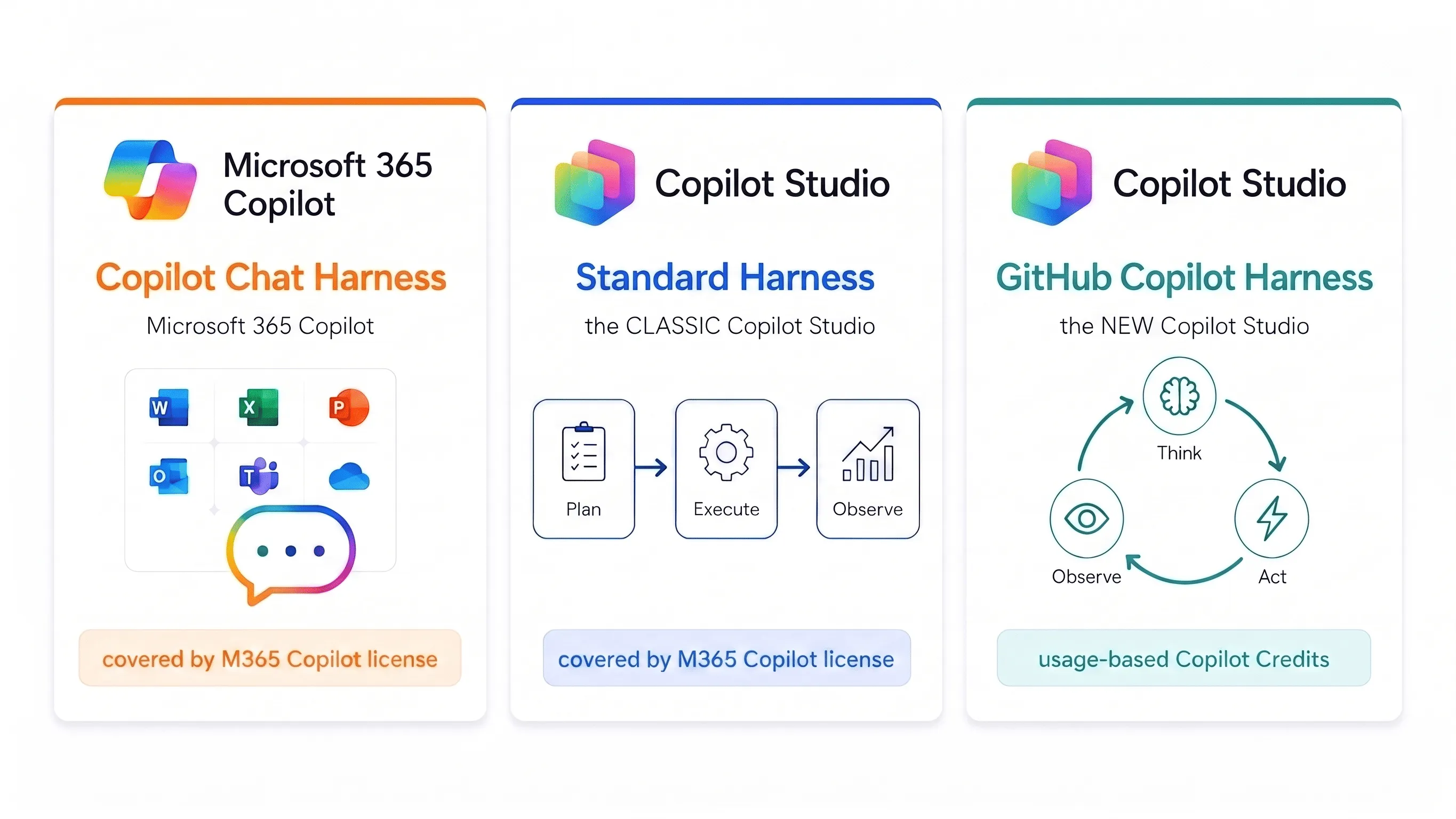
<li><strong>GitHub Copilot Harness</strong>, the new Copilot Studio. Nearly everything is usage-based Copilot Credits: AI-assisted authoring, testing and runtime all draw credits. Only manual Build-tab configuration, publishing and the Monitor tab stay free. An M365 Copilot license buys you nothing here.</li>
<li><strong>Standard Harness</strong>, the classic Copilot Studio. Consumption-based, or covered by the M365 Copilot license, though some premium features stay excluded even when you hold that license.</li>
<li><strong>Copilot Chat Harness</strong>, Microsoft 365 Copilot Chat. Consumption-based, or covered by the M365 Copilot license.</li>
</ul>
<p>What actually bugs me is further down, but here it is in one line: on the new harness even <em>testing</em> an agent costs credits. Not just the runtime. You can’t try the thing out without paying, and your M365 Copilot license doesn’t cover it.</p>

<img src="https://marlon-koenig.com/_astro/three-harnesses-compressed.nvc_MPTn_28Adf4.webp" alt="Three cards side by side mapping each product to its harness. Left, Copilot Chat Harness on Microsoft 365 Copilot with the Office app icons, covered by the M365 Copilot license. Middle, the Standard Harness, the classic Copilot Studio, shown as a Plan, Execute, Observe flow, covered by the M365 Copilot license. Right, the GitHub Copilot Harness, the new Copilot Studio, shown as a Think, Act, Observe loop, billed on usage-based Copilot Credits." />

<h2>Why I’m writing this down at all</h2>
<p>The new GitHub Copilot Harness has just landed, and it has thrown a lot of people. The confusion is all about the same thing: when, and for what, Copilot Studio actually bills you now. I’ve watched more than one person react to it with a bit of panic, and I understand why.</p>
<p>The reason for the confusion is that since the new harness went GA, “Copilot Studio” is no longer one product with one pricing model. It is three runtimes with three pricing models under one name. If you don’t know which harness your agent runs on, you simply can’t answer the question of what it costs.</p>
<p>So I dug into it.</p>
<h2>What a harness even is</h2>
<p>You can picture it best with a practical example. If I run Claude’s Opus 5, or even Opus 4.8, directly through Claude Code from Anthropic, the people who actually build that model, my coding sessions come out noticeably better than running the exact same model through a partner surface like GitHub Copilot. On paper it’s the identical model, and for most people that’s where the story ends. But the piece sitting around the model, the thing that feeds in context, calls tools and reacts to what comes back, is what actually decides how good the output is. The best model is only ever as good as the harness wrapped around it.</p>
<p>That piece in the middle is the harness. You design the agent or workflow, the model you picked does the reasoning and generation, and the harness is the runtime in between: it decides when the model gets called, which components it sees, interprets the answer and calls the right tools. Sounds like a detail. It’s actually where it gets decided what your agent can do and what it costs.</p>
<p>Because the harness determines four things at once: how the work gets done (a fixed script, or breaking a goal down into steps on its own), how much you can automate end to end, which capabilities you get out of the box (creating files, skills, memory, tool orchestration), and, yes, how you get billed.</p>
<p>And that’s exactly what’s playing out with Copilot Studio: the classic and the new experience can run the same models, and the harness still makes most of the difference in how good the answers turn out.</p>
<h2>The three harnesses and what they hang off</h2>
<h3>GitHub Copilot Harness</h3>
<div><div><div></div><div>Important: this has nothing to do with GitHub Copilot</div></div><div><p>The “GitHub Copilot” in GitHub Copilot Harness has nothing to do with the GitHub Copilot product you use for coding. Nothing is integrated in either direction, no shared product, no data flowing between them, no GitHub account or repository involved. The name comes purely from the fact that this harness runs the same underlying engine, the same runtime that wraps the model, as GitHub Copilot does. That shared harness is the entire connection.</p></div></div>
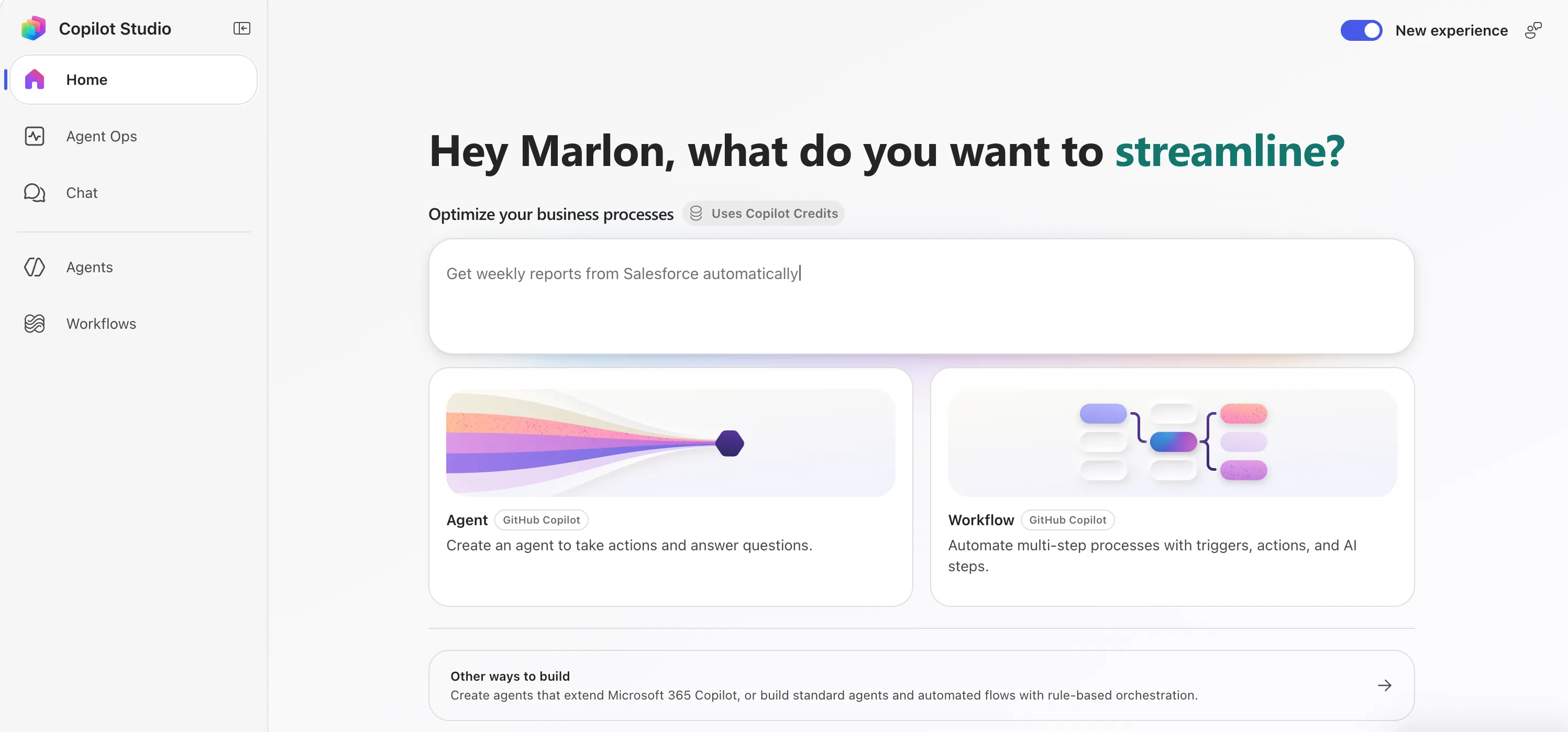
<p>What it can do, per Learn: instead of just following a fixed script it takes a goal, breaks it into steps, calls tools through connectors, knowledge, MCP and connected agents, and adapts when a step fails or the request changes. It natively creates and edits Word, Excel, PowerPoint and PDF files, supports skills and memory, and runs each task in a secured sandbox.</p>
<p><strong>What it hangs off:</strong> the new agent experience and the new workflows.</p>
<p><strong>Billing:</strong> Copilot Credits, usage-based.</p>
<img src="https://marlon-koenig.com/_astro/github-copilot-harness-home.CZswTvsS_2bElcy.webp" alt="Screenshot of the new Copilot Studio home running the GitHub Copilot Harness. The &quot;New experience&quot; toggle is switched on in the top right, the heading reads &quot;Hey Marlon, what do you want to streamline?&quot;, and under &quot;Optimize your business processes&quot; a badge reads &quot;Uses Copilot Credits&quot;. Two cards below, Agent and Workflow, are both tagged &quot;GitHub Copilot&quot;." />
<h3>Standard Harness</h3>
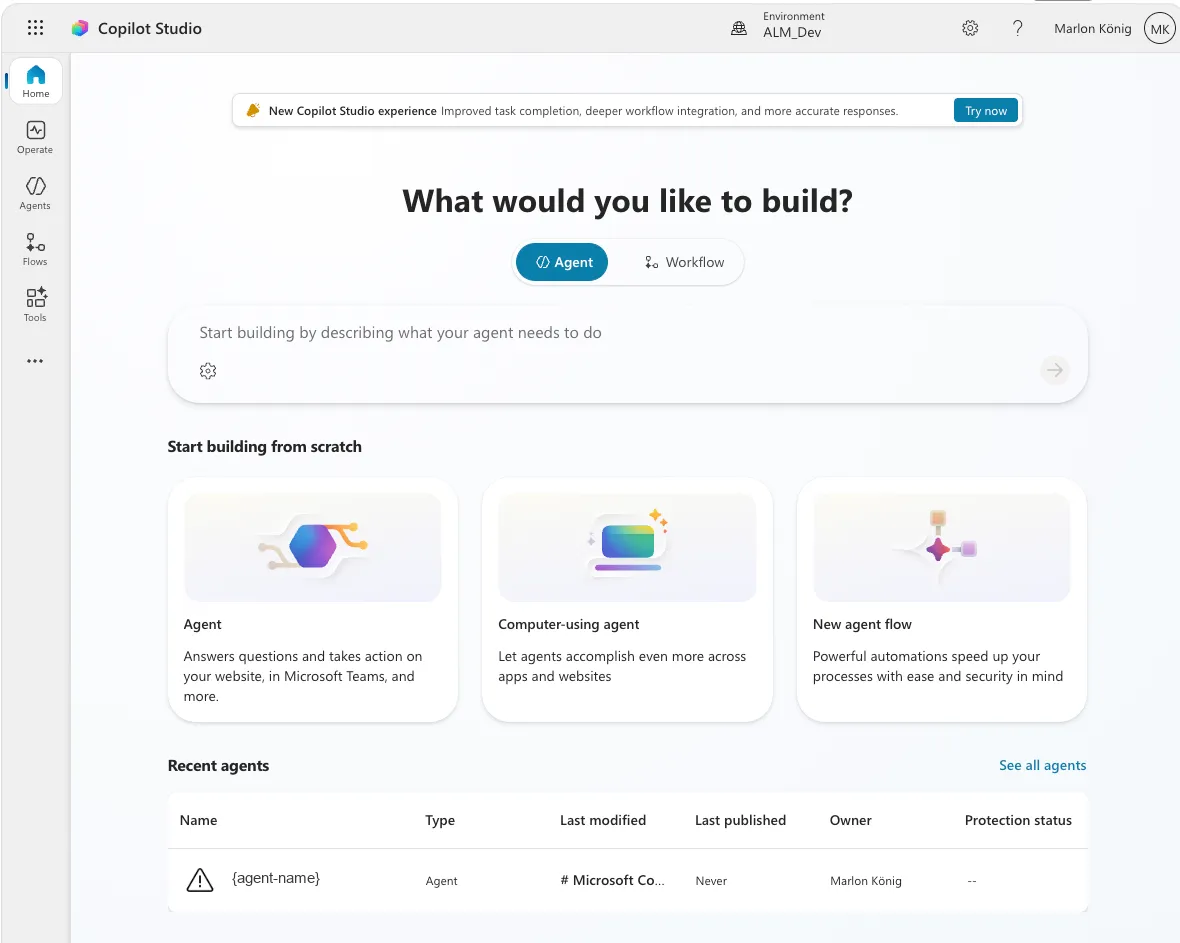
<p>The classic example is an internal helpdesk that answers standard questions and routes simple requests onward.</p>
<p><strong>What it hangs off:</strong> the classic agent experience and Agent Flows.</p>
<p><strong>Billing:</strong> consumption-based, or covered by the M365 Copilot user license, following the existing licensing and billing model from the Copilot Studio licensing guide.</p>
<img src="https://marlon-koenig.com/_astro/standard-harness.DDSMv_06_1f6kKt.webp" alt="Screenshot of the classic Copilot Studio home, the Standard Harness. The heading reads &quot;What would you like to build?&quot; with an Agent / Workflow toggle and a &quot;Start building from scratch&quot; row of three cards: Agent, Computer-using agent and New agent flow. A Recent agents table at the bottom lists one anonymised agent {agent-name}, and a banner up top advertises the New Copilot Studio experience." />
<h3>Copilot Chat Harness</h3>
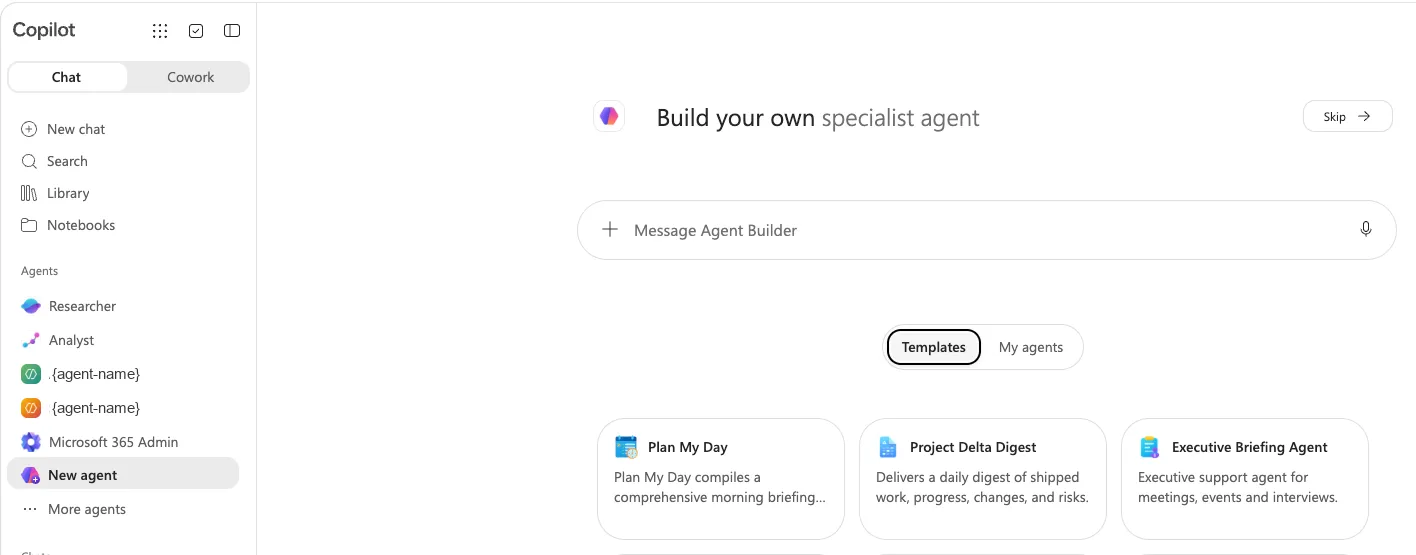
<p>The narrowest of the three, and the one with the clearest purpose. It connects your enterprise knowledge to Microsoft 365 Copilot Chat so employees get grounded answers without leaving the environment they already work in. Typical case: an onboarding agent that answers from SharePoint content.</p>
<p>Here you only publish to internal teams.</p>
<p><strong>Billing:</strong> consumption-based, or covered by the M365 Copilot user license.</p>
<img src="https://marlon-koenig.com/_astro/copilot-chat-harness.Cm_25T2W_Z1D17gp.webp" alt="Screenshot of the Microsoft 365 Copilot agent builder, the Copilot Chat Harness. &quot;Build your own specialist agent&quot; sits above a Message Agent Builder box, with Templates like Plan My Day, Project Delta Digest and Executive Briefing Agent below. The left rail lists agents, the built-in Researcher and Analyst plus two anonymised custom agents {agent-name}." />
<h2>How the Standard and GitHub Copilot harnesses work, and why the loop is the real difference</h2>
<p>The billing split makes more sense once you see how the two harnesses actually run a request. They don’t just cost differently, they think differently.</p>
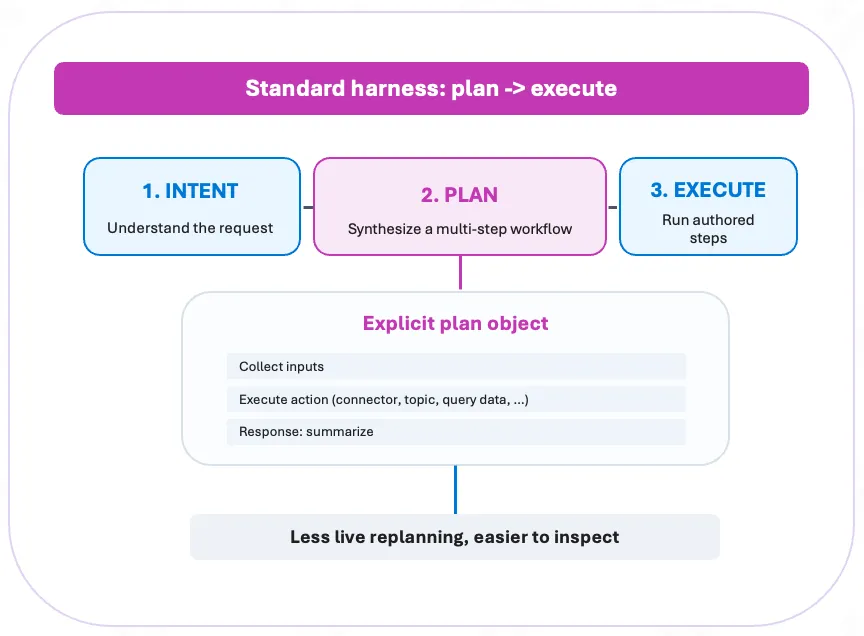
<p>The Standard Harness plans, then executes. It reads the request, synthesises a multi-step workflow up front, and runs the authored steps in order. The plan is an explicit object you can look at: collect the inputs, run an action (a connector, a topic, a data query), summarise the response. Because the plan is fixed before anything runs, there’s less live replanning and the whole thing is easier to inspect.</p>
<img src="https://marlon-koenig.com/_astro/standard-harness-plan-execute.Btm99p7f_1146kc.webp" alt="Diagram of the Standard Harness as plan then execute: three stages left to right: 1. Intent (understand the request), 2. Plan (synthesise a multi-step workflow), 3. Execute (run authored steps). Below sits an explicit plan object listing collect inputs, execute action (connector, topic, query data), and response: summarize. A banner underneath reads &quot;Less live replanning, easier to inspect&quot;." />
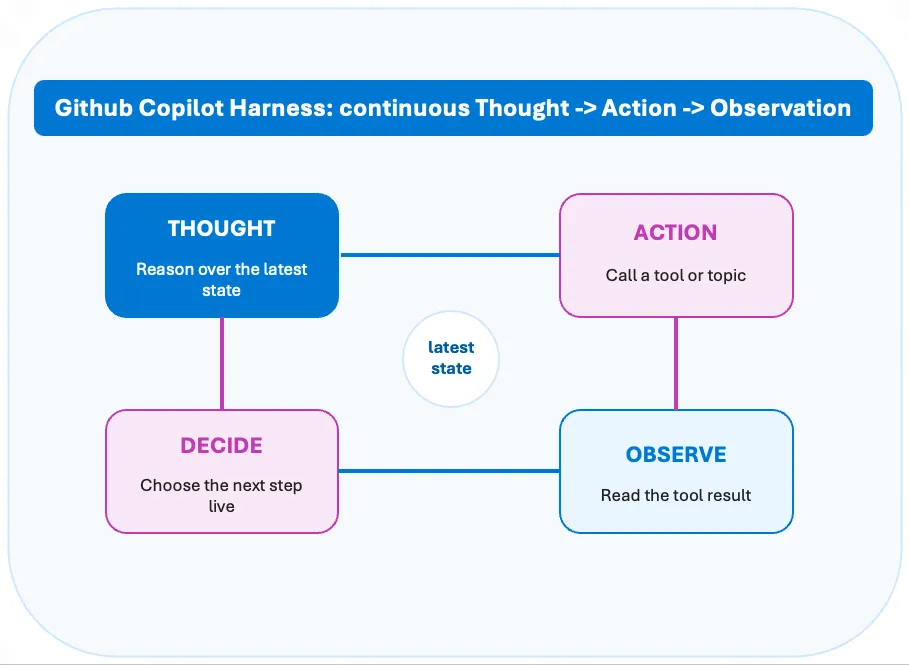
<p>The GitHub Copilot Harness runs a loop instead. It doesn’t commit to a plan up front. It reasons over the latest state, calls a tool or topic, reads the result, decides the next step live, and goes round again: Thought, Action, Observation, Decide, repeat. The plan emerges as it goes, and it can change course after every observation.</p>
<img src="https://marlon-koenig.com/_astro/github-copilot-harness-loop.xPoQ9_OY_Z1PqSma.webp" alt="Diagram of the GitHub Copilot Harness as a continuous Thought, Action, Observation loop: four boxes arranged around a central &quot;latest state&quot; circle: Thought (reason over the latest state), Action (call a tool or topic), Observe (read the tool result), Decide (choose the next step live), connected in a cycle." />
<p>That loop is the whole point of the new harness, and it’s a genuine benefit. A plan-and-execute model has to be right about the plan before it has seen any results. The loop doesn’t. When a tool returns something unexpected, when a step fails, when the request turns out to be more complicated than it looked, the loop just reasons over the new state and picks a different next step. That’s what lets it handle the long-running, multi-system work the Standard Harness can’t: it adapts mid-run instead of falling off the end of a script.</p>
<p>The trade-off is the flip side of the same coin, and it ties straight back to the cost section. The loop’s freedom to replan is exactly what makes it consume credits while you build and test, and what makes a run harder to predict up front. Plan-then-execute is cheaper and easier to inspect precisely because it does less thinking on the fly. So the loop isn’t strictly better, it’s better for the class of problem that needs it, which is the same conclusion the pricing pushes you toward from the other direction.</p>
<h2>The question I had to answer: can I pick the harness?</h2>
<p>That was the most interesting open question for me. If Copilot Studio has three harnesses now, is there a dropdown somewhere?</p>
<p>Short answer: no.</p>
<p>There’s no setting to pick, and no way to change it after the fact. The harness is decided one step earlier: it simply depends on where you create the agent, in the new experience or the classic one.</p>
<p>And it’s a one-way street. Agents created in the new experience can’t be moved into the classic one, and the other way round doesn’t work either. The two are built on fundamentally different architectures.</p>
<h2>The licensing comparison: before and now</h2>
<p>And now we get to the part that causes the most confusion.</p>


<table><thead><tr><th></th><th>Standard / Copilot Chat Harness<br />(the familiar one)</th><th>GitHub Copilot Harness<br />(new experience)</th></tr></thead><tbody><tr><td><strong>When billing starts</strong></td><td>After publish</td><td><strong>When you test or author with AI</strong></td></tr><tr><td><strong>Natural Language Authoring</strong></td><td>Included</td><td><strong>Costs credits</strong></td></tr><tr><td><strong>Testing / Preview</strong></td><td>Included</td><td><strong>Costs credits</strong></td></tr><tr><td><strong>Evaluations</strong></td><td>Included</td><td><strong>Costs credits</strong></td></tr><tr><td><strong>Publishing</strong></td><td>Included</td><td>No credits</td></tr><tr><td><strong>Build tab (manual configuration)</strong></td><td>Included</td><td>No credits</td></tr><tr><td><strong>Monitor tab</strong></td><td>Included</td><td>No credits</td></tr><tr><td><strong>Runtime in the tenant</strong></td><td>Covered by M365 Copilot license (eligible scenarios)</td><td><strong>Costs credits, license gives no benefit</strong></td></tr><tr><td><strong>Work IQ APIs</strong></td><td>Separately via credits</td><td>Separately via credits</td></tr><tr><td><strong>Billing currency</strong></td><td>Copilot Credits</td><td>Copilot Credits</td></tr></tbody></table>
<p>On that last row, because it’s the most misunderstood point: both sides bill in the same currency. Copilot Credits are the shared currency across all Copilot Studio capabilities, and since 1 September 2025 the currency for agents changed from Messages to Copilot Credits, with no change to the amount per prepaid pack or to the pay-as-you-go rate.</p>
<p>Read down that new-experience column and the pattern is stark. On the GitHub Copilot Harness the Build tab, as long as you’re configuring by hand and not letting it author for you, and the Monitor tab are the only two places that don’t touch credits. Everything else does.</p>
<p>So “it used to be free” isn’t true. It was covered, and that’s a different thing.</p>
<p>If you have a Microsoft 365 Copilot license, using <strong>Standard Harness</strong> agents in Copilot Chat, Teams or SharePoint for classic answers, generative answers or Microsoft Graph tenant grounding doesn’t count against the Copilot Studio message pack or meter. That usage is zero-rated. Agent flow actions triggered by M365-Copilot-licensed users are included at no extra cost too, though only for flows using the “When an agent calls the flow” trigger; other triggers still consume credits, and Computer-Using Agents are excluded from the license entitlement altogether.</p>
<p>The crucial catch: none of that applies to the <strong>GitHub Copilot Harness</strong>. Microsoft states plainly that agents on the GitHub Copilot Harness use usage-based billing for all work, regardless of Microsoft 365 Copilot licensing. So the “we already have the licenses, it’s covered” reasoning holds on the Standard Harness and evaporates the moment you’re on the new one.</p>
<p>Testing and running were, on the Standard Harness with an M365 license, effectively all-inclusive. With one exception I’ll get to in a second.</p>
<p>Something that also applies to the Standard side and gets forgotten a lot: Copilot Studio enforces the capacity you bought on a monthly basis, unused credits don’t roll over to the next month, and if you go over, technical enforcement kicks in. There’s a grace buffer, and per the current guidance enforcement bites at around 125% of your prepaid capacity rather than the instant you hit 100%, but at that point agents get disabled and further invocations are rejected until you top up or the month resets.</p>
<div><div><div></div><div>IMPORTANT</div></div><div><p>The metered part on the GitHub Copilot Harness is the exact loop you use to make an agent good: authoring with AI, previewing, testing and evaluating all draw credits, and billing no longer waits for publish. Only purely manual Build-tab edits and the Monitor tab stay free.</p></div></div>
<h2>What actually bugs me about this</h2>
<p>It isn’t the runtime costs. It’s that testing costs money, and the reason gets lost in the noise. The GitHub Copilot Harness is genuinely better: reasoning, tool use, file handling all take a visible jump. But “better” doesn’t mean you type three sentences of instructions and you’re done. A good agent is fast, doesn’t reach for six tools on every little question, and is cost-optimised, and that last twenty percent of quality only comes out of dozens of iterations. Change the wording, test. Swap the knowledge source, test. Pull a tool and see if the answer still holds, test.</p>
<p>Every one of those runs now has a meter on it. Spend an afternoon tuning and re-testing after each change and you can burn through a few hundred preview runs before lunch, each one billed. So the road to a cost-optimised agent is paved with runs that cost money: cost optimisation costs money.</p>
<p>What bothers me more is the effect on behaviour. I work differently when a meter is running. You test less, you test shallower, you skip the edge case that’s probably fine. Then the agent ships with exactly that edge case. My gut says worse-tested agents cost more in production than the test runs you saved.</p>
<p>On runtime costs I’m relaxed: for a manageable group or external users, credits often beat the license route anyway. What’s lost is the harmlessness. Before, I could tell a customer “you already have the licenses, just try it out, it costs nothing extra.” On the GitHub Copilot Harness that sentence is gone. And in an org where someone other than the builder sees the bill, one surprise month is enough to freeze the next agent project in approval. That’s not a cost problem, it’s a political one. (Microsoft is finally shipping guardrails for exactly this.)</p>
<p>There’s a learning-curve angle to this too. A lot of people aren’t fluent at building agents yet, and plenty genuinely don’t know whether an agent even makes sense for their use case until they’ve tried a handful. That trying-out phase is where they find out, and it’s exactly the phase the meter now taxes. That’s why I’d rather see this kind of exploratory use bundled into the M365 Copilot license, or included some other way: let people work out whether it’s worth it before the cost clock starts.</p>
<p>I don’t want to oversell it. The model is fair. Microsoft has to put the compute cost of frontier models somewhere, and consumption reflects real work better than a flat rate. It still takes the lightness out. And lightness was an underrated reason people got started with agents at all.</p>
<h2>And how long does the classic one stick around?</h2>
<p>If the classic route is cheaper, how long can I keep using it? Officially, indefinitely: the Learn doc says the classic experience stays fully supported alongside the new one. That’s not a deprecation, and there’s no end date.</p>
<p>The only hard dates concern the Teams route, and they live in tenant-only Message Center posts, not the public docs: creating classic agents from the Copilot Studio app in Teams is being retired in favour of the web app, originally slated for around 1 April 2026, then pushed to 30 June 2026. Existing agents keep running and users get redirected automatically. That’s a channel change, not a deprecation, so check your own Message Center for the current date.</p>
<p>For a sense of pace, look at the precedent. The Power Virtual Agents → Copilot Studio rename was late 2023; almost three years on, the migration guide is still live, still updated, and still says extra tooling to migrate classic bots “might” arrive in the future. No binding deadline was ever set, and existing bots keep running. Microsoft is a master at keeping product versions alive in parallel for years.</p>
<p>So the pressure is lower than it feels. Even the advocates I talk to don’t blanket-recommend the GitHub Copilot Harness for everything, and when the newest-thing crowd starts differentiating, that’s a signal. What you should change today is where you create <em>new</em> things, not what you do with the existing ones.</p>
<h2>What it costs</h2>
<p>I’m going to write something specific about how high the costs actually are, so I’ll keep it short here. For now the one thing worth doing is putting your own scenario into Microsoft’s calculator:</p>
<p><strong>➡️ <a href="https://microsoft.github.io/copilot-studio-estimator/" rel="noopener noreferrer" target="_blank">Copilot Credit Estimator</a></strong></p>
<p>You pick licensing options, agent types and the features your agent uses, and you see the resulting credit consumption. One caveat to keep in mind: the estimator was originally built for the classic Copilot Studio, not the new experience, so the credit numbers it gives you can be off for a GitHub Copilot Harness agent. Treat it as a starting point for the conversation with finance, not a quote.</p>
<h2>What I’m taking away for practice</h2>
<p>If there’s one thing this shift makes clear, it’s that good governance matters more now than it ever has. The companies that already sorted out spend policies, thresholds and clear ownership are the ones this lands softly on. The new billing model just slots into controls they were already running, and the move pays off exactly when it counts.</p>
<p>For everyone who hasn’t got there yet, it’s the other way round. The meter is already running, and you’re putting the guardrails up after the spending has started instead of before. That’s the worse place to be, and it gets more expensive the longer it waits.</p>
<p>So the takeaway is simple: sort the governance out now, not once the first surprise bill lands.</p>
<h2>Resources</h2>
<ul>
<li><a href="https://cdn-dynmedia-1.microsoft.com/is/content/microsoftcorp/microsoft/bade/documents/products-and-services/en-us/ai/Microsoft-Copilot-Credits-Guide-August-2026.pdf" rel="noopener noreferrer" target="_blank">Microsoft Copilot Credits Guide, August 2026 (PDF)</a></li>
<li><a href="https://learn.microsoft.com/en-us/microsoft-copilot-studio/agents-experience/billing-credit-overview" rel="noopener noreferrer" target="_blank">Billing and credits overview, Microsoft Learn</a></li>
<li><a href="https://learn.microsoft.com/en-us/microsoft-copilot-studio/requirements-messages-management" rel="noopener noreferrer" target="_blank">Billing rates and management, Microsoft Learn</a></li>
<li><a href="https://microsoft.github.io/copilot-studio-estimator/" rel="noopener noreferrer" target="_blank">Copilot Credit Estimator</a></li>
<li><a href="https://techcommunity.microsoft.com/blog/copilot-studio-blog/more-powerful-agents-and-workflows-for-autonomous-business-processes-introducing/4542969" rel="noopener noreferrer" target="_blank">Introducing a new harness for Copilot Studio, Microsoft Community Hub</a></li>
</ul>]]></content>
    <category term="Copilot Studio" />
    <category term="Licensing" />
  </entry>
  <entry>
    <title>Sorry, something unexpected happened: Calling a Copilot Studio (New Experience) agent from Power Automate</title>
    <link href="https://marlon-koenig.com//posts/copilot-studio-agent-power-automate" rel="alternate" type="text/html"/>
    <id>https://marlon-koenig.com//posts/copilot-studio-agent-power-automate</id>
    <updated>2026-07-30T00:00:00.000Z</updated>
    <published>2026-07-30T00:00:00.000Z</published>
    <author>
      <name>Marlon König</name>
    </author>
    <summary type="text">An agent from the new Copilot Studio only answers with an InvalidContent error in the classic Power Automate step, and the flow still reports success. Here is how I got it working anyway, using the workflow builder, a small URL trick and copy/paste.</summary>
    <content type="html"><![CDATA[<img src="https://marlon-koenig.com/_astro/cover.CEbkHMew_2aA4wD.webp" alt="Sorry, something unexpected happened: Calling a Copilot Studio (New Experience) agent from Power Automate" style="width: 100%; height: auto; margin-bottom: 1em;" />
<p>import urlSwapGif from ”./assets/workflow-builder-url-swap-copy-paste.gif?url”;</p>
<p>This is my first blog post, and I’m starting with something that kept me busy for quite a few days. I wanted to call an agent from the new Copilot Studio, so the New Experience, out of an existing Power Automate flow. Sounds like a small thing. It really wasn’t.</p>
<p>Let me take you through the whole thing: what the scenario was, where it broke, and how I got it working in the end.</p>
<div><div><div></div><div>NOTE</div></div><div><p>One thing up front about the screenshots: the flow you see in them is not our actual live flow. I rebuilt the scenario as a small pseudo test flow purely to illustrate it here. The structure matches what I really ran, it just doesn’t contain any real data or customer specifics.</p></div></div>
<h2>Where I started</h2>
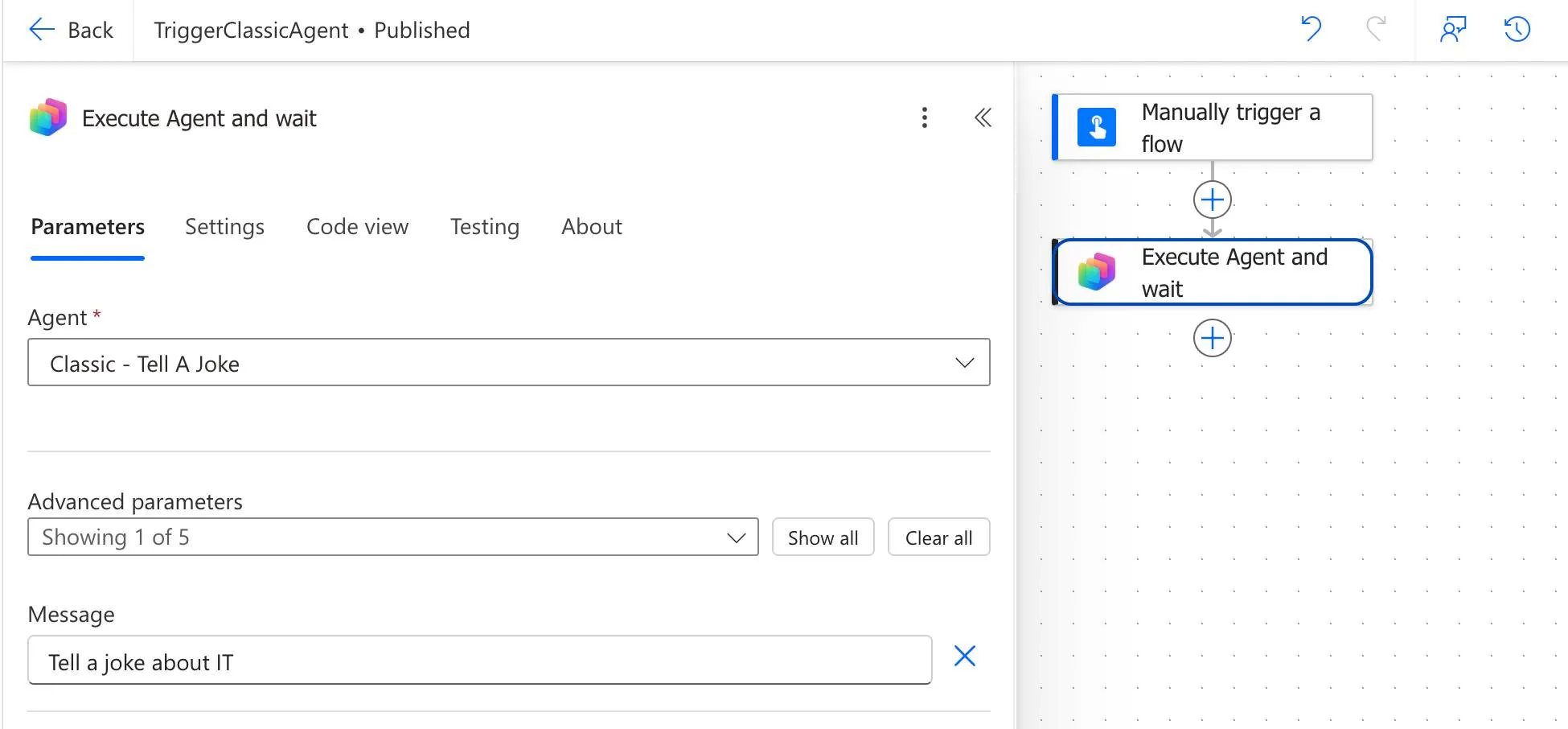
<p>We had a Power Automate flow that runs the “Execute Agent and wait” step from the Copilot Studio connector. So it calls an agent I built in Copilot Studio beforehand, and the flow then patiently waits until an answer comes back. With the old Copilot Studio that worked fine, that was our proven setup.</p>
<figure><img src="https://marlon-koenig.com/_astro/power-automate-execute-agent-step.V6wFqqos_Z1hkCDF.webp" alt="Power Automate flow &quot;TriggerClassicAgent&quot;: on the left the parameters of the &quot;Execute Agent and wait&quot; step with the agent dropdown and the message field, on the right the flow made up of a manual trigger and the agent step" /><figcaption>The existing flow: a manual trigger, then “Execute Agent and wait”. The <em>Agent</em> parameter holds the agent, and “Tell a joke about IT” goes in as the <em>Message</em>.</figcaption></figure>
<h2>Why I wanted to switch in the first place</h2>
<p>The new Copilot Studio (new experience), has been around for a while now. It isn’t GA yet, so not generally available, but I think it’s already surprisingly mature.</p>
<p>What actually triggered all of this was one specific agent. I believe it was a business agent to begin with, and it didn’t work particularly well in the old Copilot Studio. The exact same agent in the new Copilot Studio worked a lot, and I mean a lot better. From what I can tell that comes down to the new orchestrator, or rather the new engine running underneath. So if an agent is behaving oddly for you in the old studio, I’d definitely test it against the New Experience.</p>
<p>And from there the idea was obvious. I take the Power Automate flow I already have and just put the other agent into that step. Same flow, just the agent from the new studio instead of the old one.</p>
<h2>Two agents that look exactly alike</h2>
<p>To show that nothing exotic is going on here, I built two deliberately boring agents for this article. Both are supposed to do nothing but tell a joke.</p>
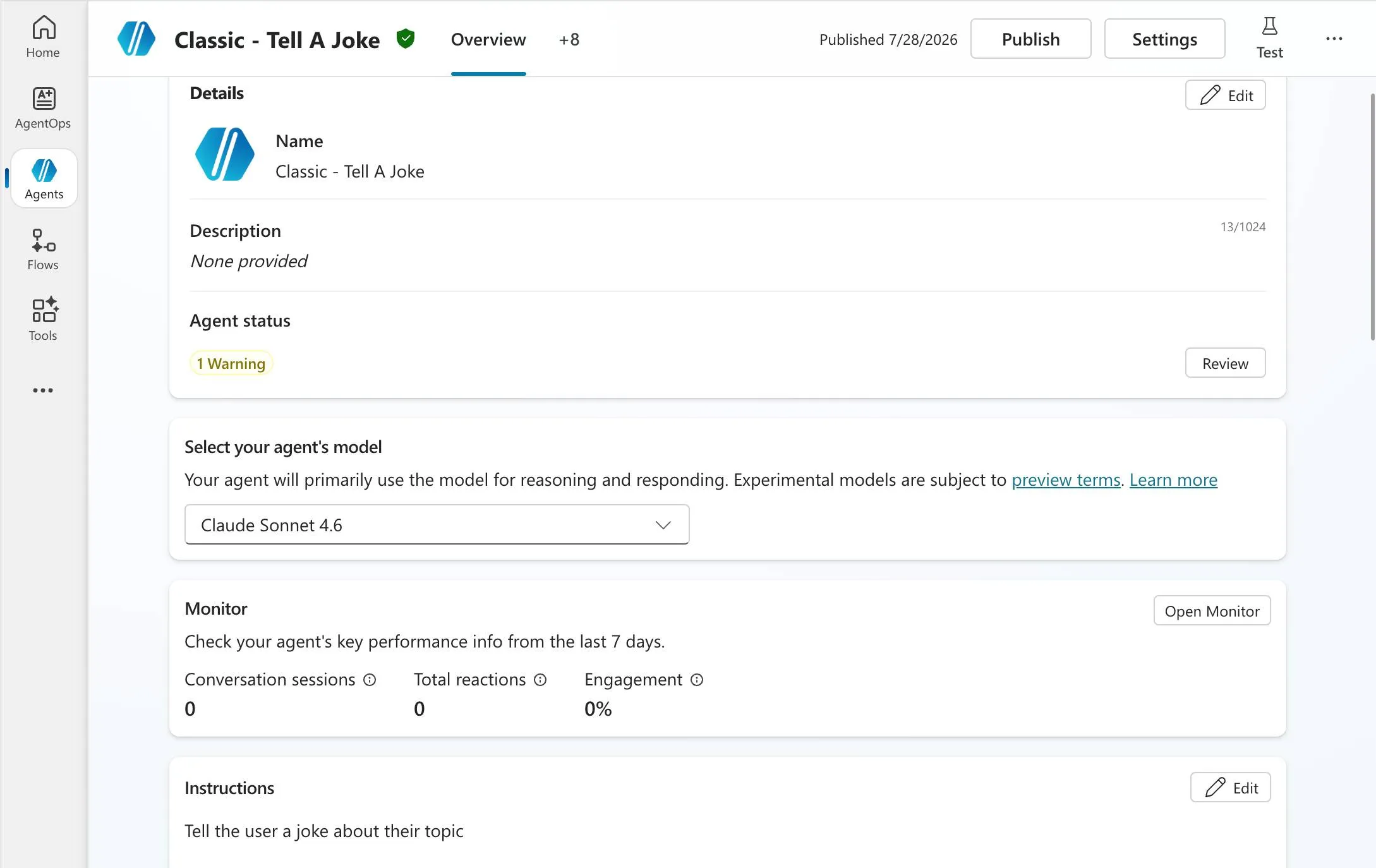
<p>One lives in the classic Copilot Studio and is called “Classic - Tell A Joke”.</p>
<figure><img src="https://marlon-koenig.com/_astro/agent-classic-configuration.DXAnAISH_1oIAaY.webp" alt="Overview page of the &quot;Classic - Tell A Joke&quot; agent in the classic Copilot Studio, showing the model picker set to Claude Sonnet 4.6 and the instructions" /><figcaption>The classic agent: Claude Sonnet 4.6 as the model, “Tell the user a joke about their topic” as the instruction.</figcaption></figure>
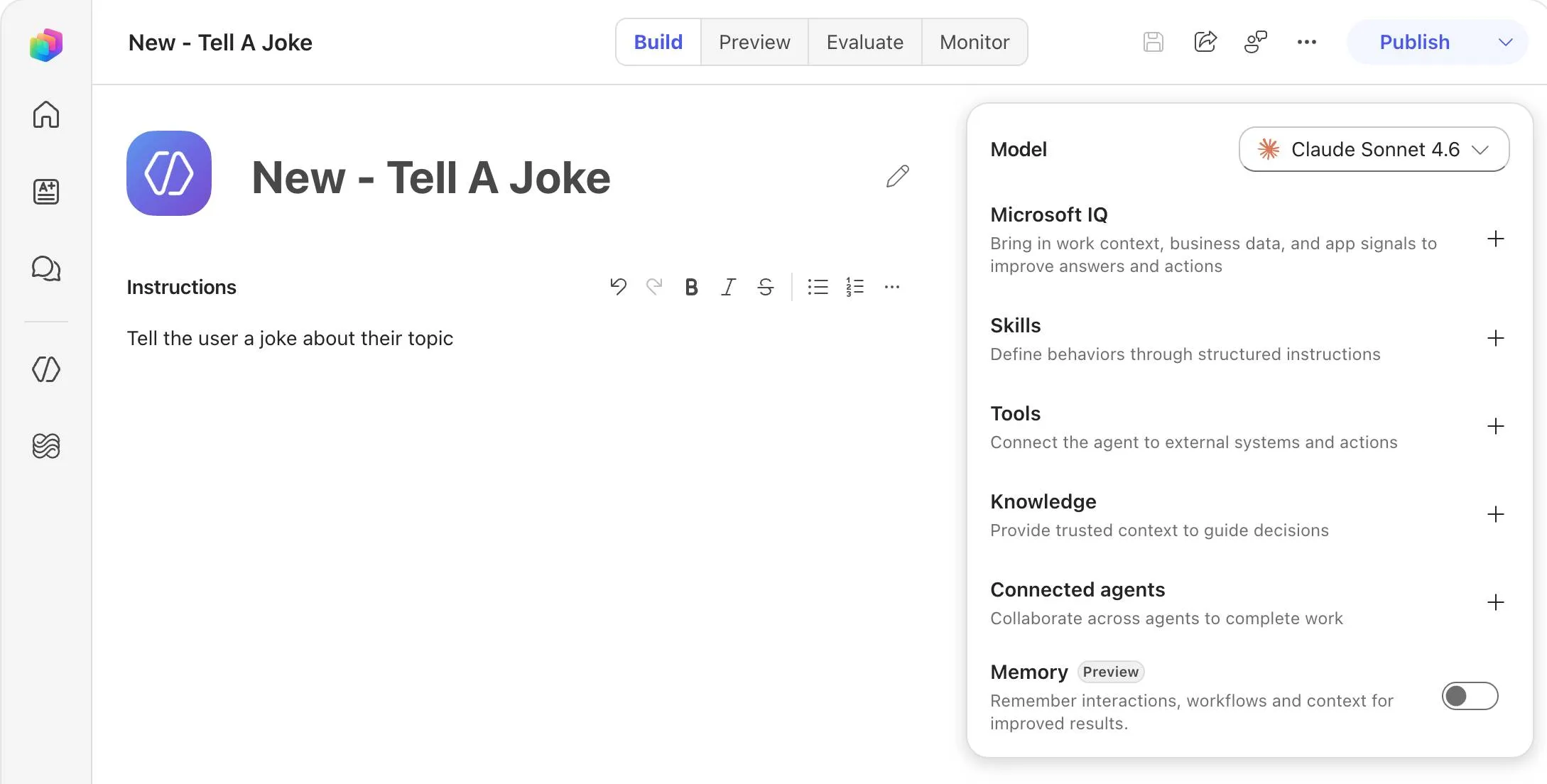
<p>The other lives in the New Experience and is called “New - Tell A Joke”.</p>
<figure><img src="https://marlon-koenig.com/_astro/agent-new-experience-configuration.bFcg4CfB_Z6oQ9w.webp" alt="Build view of the &quot;New - Tell A Joke&quot; agent in the new Copilot Studio, with the same Claude Sonnet 4.6 model and the same instruction" /><figcaption>The agent in the New Experience. Same model, same instruction, just a different interface around it.</figcaption></figure>
<p>Same model, same instruction, same job. The only difference is which studio the agent sits in. That matters to me because it rules out all the obvious explanations: it isn’t a complicated agent, it isn’t knowledge, it isn’t tools, and it isn’t some setting I forgot on one side.</p>
<h2>And then came the error</h2>
<p>That’s where it started. And in a way that is easy to miss at first.</p>
<p>The flow runs through just fine. Green check, “Your flow ran successfully”, the “Execute Agent and wait” step says <em>Succeeded</em>. No red failure, nothing. If you only look at the run status, you’d think everything is fine.</p>
<p>The error sits in the response itself. You have to expand the step and look at the <code>body</code>.</p>
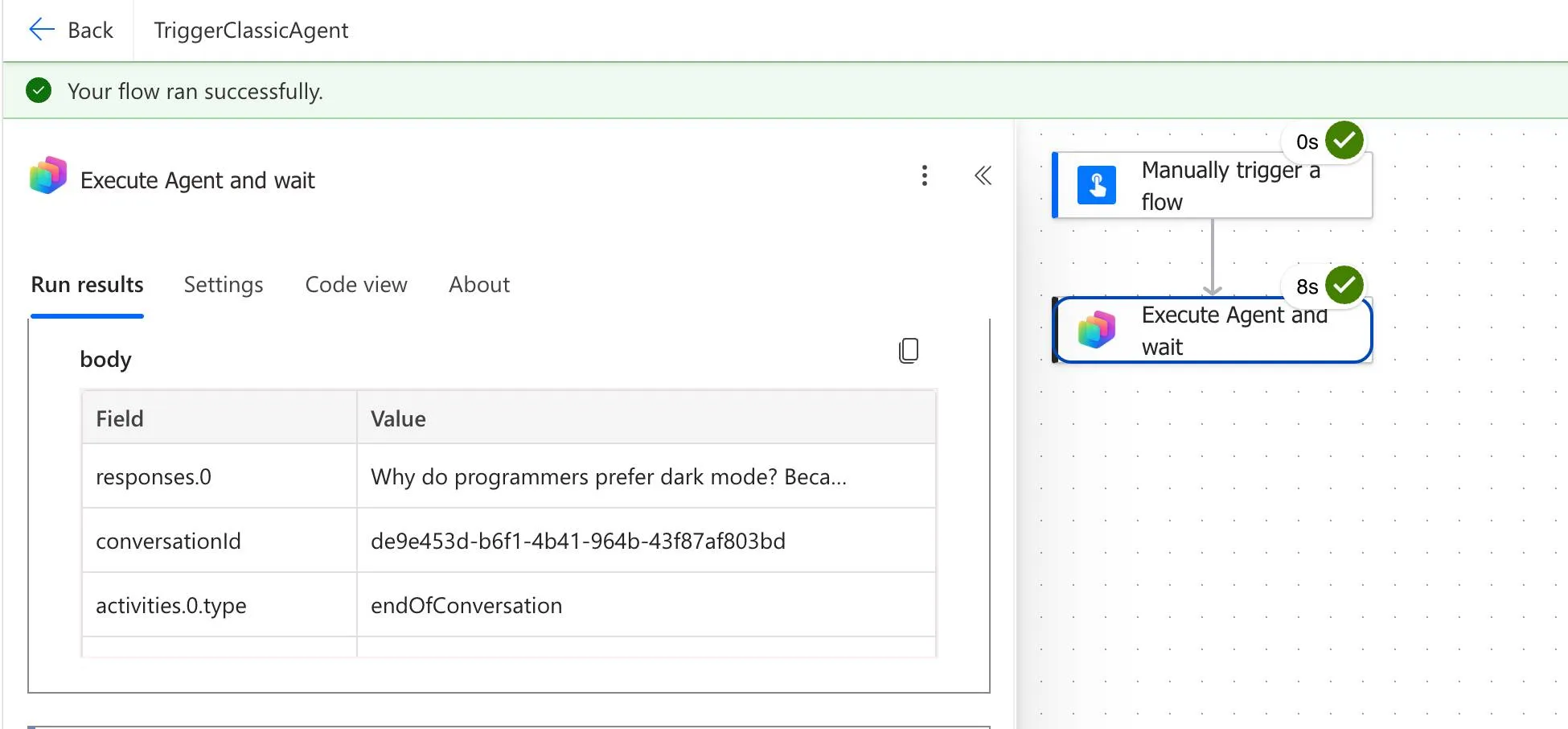
<p>And that is where it gets awkward, because the two runs look practically identical at first glance. Here is the run with the classic agent first, the way it is supposed to go:</p>
<figure><img src="https://marlon-koenig.com/_astro/flow-succeeded-classic.Cm-vEh_O_TSSRJ.webp" alt="Power Automate run &quot;TriggerClassicAgent&quot;: green success banner at the top, the body shows the beginning of a joke in responses.0, activities.0.type is endOfConversation, and the step took 8 seconds" /><figcaption>The run with the classic agent. <code>responses.0</code> actually holds a joke, and <code>activities.0.type</code> is <code>endOfConversation</code>.</figcaption></figure>
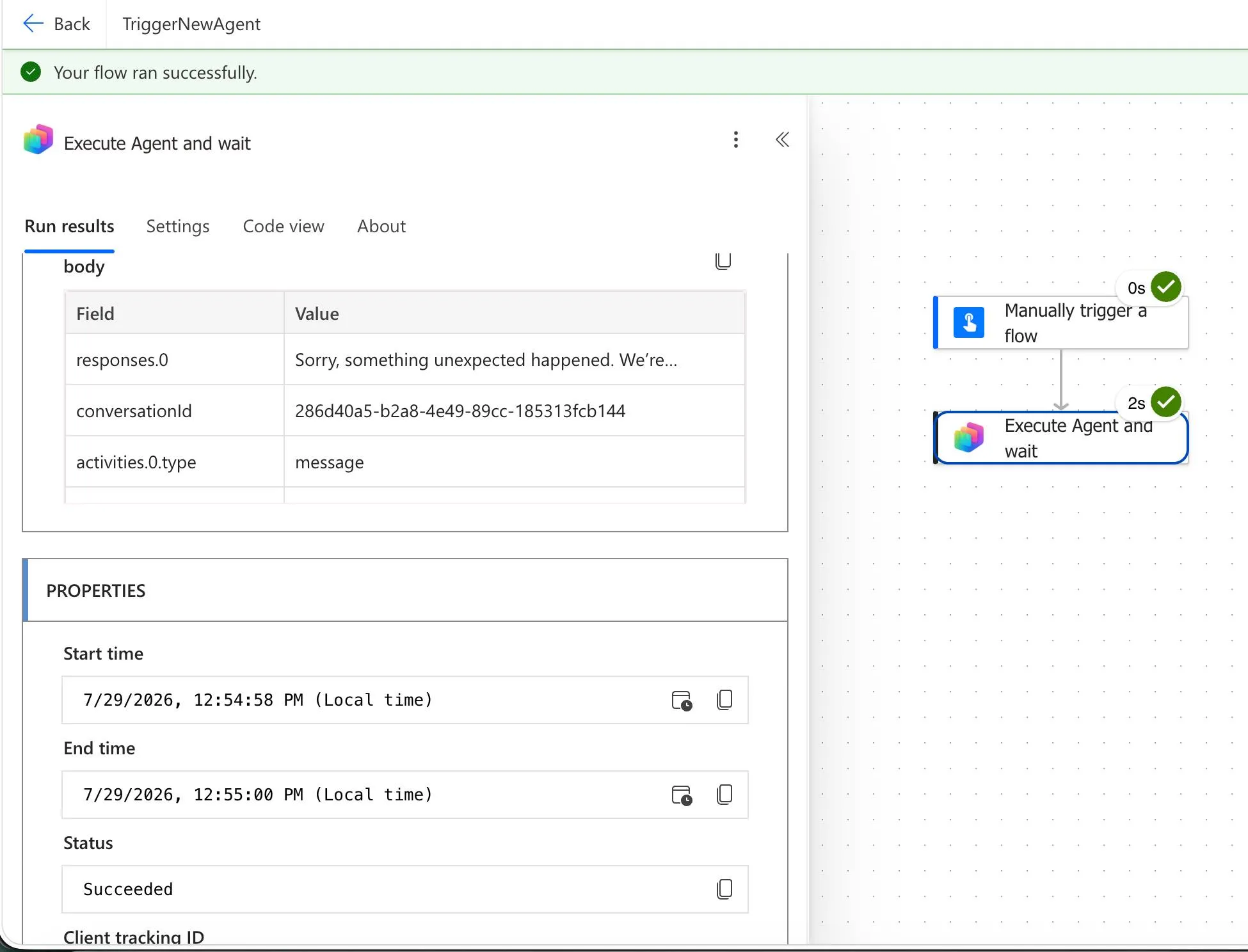
<p>And here is the same flow with the agent from the New Experience:</p>
<figure><img src="https://marlon-koenig.com/_astro/flow-succeeded-invalidcontent.Cjl2_HdH_181xDj.webp" alt="Power Automate run &quot;TriggerNewAgent&quot;: the same green success banner at the top, the body shows the error message in responses.0, activities.0.type is message, and the step took 2 seconds" /><figcaption>The run with the New Experience agent. Same green check at the top, but <code>responses.0</code> holds the error message.</figcaption></figure>
<p>Same green banner both times, status <em>Succeeded</em> both times. The entire difference sits in the <code>body</code>:</p>


<table><thead><tr><th></th><th>Classic agent</th><th>New Experience agent</th></tr></thead><tbody><tr><td>Banner at the top</td><td>Your flow ran successfully</td><td>Your flow ran successfully</td></tr><tr><td>Step duration</td><td>8s</td><td>2s</td></tr><tr><td><code>activities.0.type</code></td><td><code>endOfConversation</code></td><td><code>message</code></td></tr><tr><td><code>responses.0</code></td><td>“Why do programmers prefer dark mode? Beca…”</td><td>“Sorry, something unexpected happened…”</td></tr></tbody></table>
<p>Spelled out, the response from the New Experience looks like this:</p>
<div>
<pre><code>Sorry, something unexpected happened. We're looking into it. Error code: InvalidContent. Conversation ID: {conversation-id}. Time (UTC): 7/29/2026 10:54:59 AM
</code></pre>
</div>
<p>So technically the agent answers politely, its answer just happens to be an error message. To Power Automate that is a perfectly valid result, hence the green check. And if you process that response further in your flow, you quietly pass this text along, into an email or a Teams post for example.</p>
<p>Two small things only jumped out at me once I put the runs side by side. The broken run is noticeably faster at two seconds than the working one at eight, which makes sense, it bails out immediately. And <code>activities.0.type</code> is <code>endOfConversation</code> for the classic agent but <code>message</code> for the new one. If you want to build a check into your flow, that is probably the more honest anchor than the run status.</p>
<p>And it was stubborn. We tried a few variations, but there was simply no normal way around it. The error stayed.</p>
<h2>First glimmer of hope: the workflow builder</h2>
<p>After poking at it for a while I had the idea to come at it from the other side. So not use the “old” Power Automate, but the new workflow builder that you now also get through the new Copilot Studio.</p>
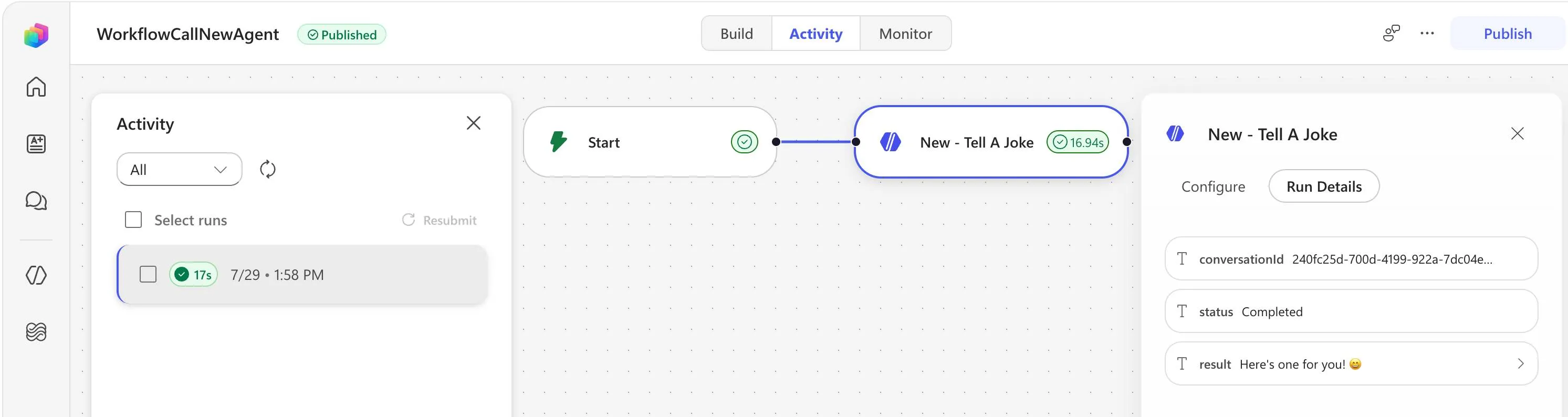
<p>Said and done. I rebuilt the exact same scenario there, called the agent as an action, ran it. And lo and behold, it worked. Same agent, just called from the workflow builder, and suddenly it goes through.</p>
<figure><img src="https://marlon-koenig.com/_astro/workflow-builder-new-agent.CbwkO1aA_Z1Bsy3o.webp" alt="Workflow builder &quot;WorkflowCallNewAgent&quot; in the activity view: a start node and a &quot;New - Tell A Joke&quot; node with a green check and 16.94 seconds, and on the right the run details showing status Completed and the result &quot;Here's one for you!&quot;" /><figcaption>The same New Experience agent, called from the workflow builder. Status <em>Succeeded</em>, and <code>result</code> holds a joke instead of an error message.</figcaption></figure>
<p>And while doing that I noticed something I almost find more important than the workaround itself: the workflow builder can call <strong>both</strong> kinds of agents. The ones from the New Experience just as well as the classic ones. Classic Power Automate, out of the box, can only call the classic ones.</p>


<table><thead><tr><th>Calling …</th><th>Classic Power Automate</th><th>Workflow builder</th></tr></thead><tbody><tr><td>Classic agents</td><td>yes</td><td>yes</td></tr><tr><td>New Experience agents</td><td>no, only through the workaround</td><td>yes</td></tr></tbody></table>
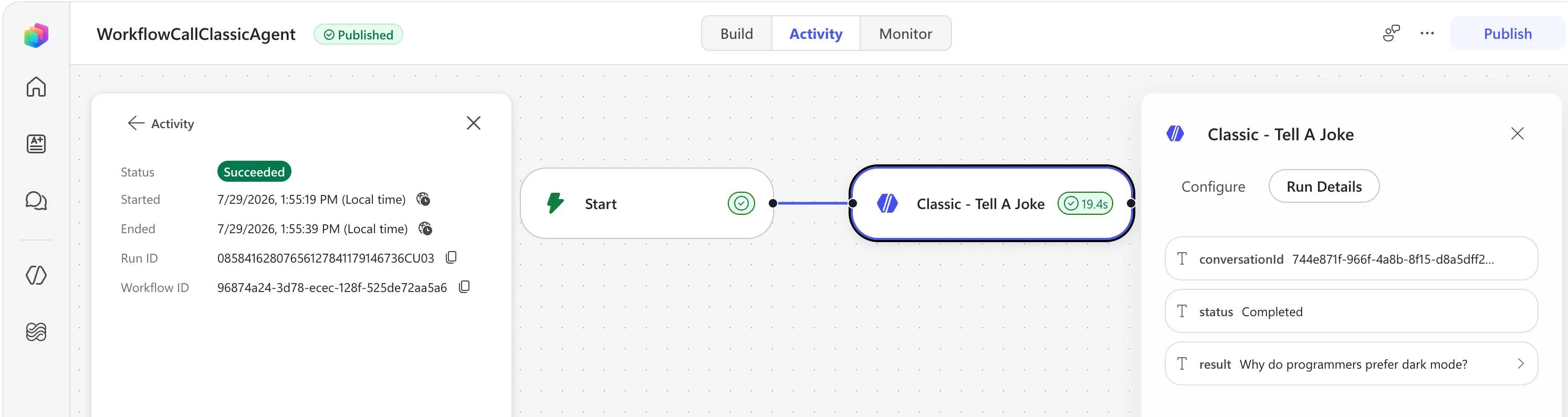
<p>To prove the other half, I rebuilt the same setup with the classic agent in the workflow builder. Runs through without a hitch as well:</p>
<figure><img src="https://marlon-koenig.com/_astro/workflow-builder-classic-agent.I6CXhxhB_Z19xA6T.webp" alt="Workflow builder &quot;WorkflowCallClassicAgent&quot; in the activity view: status Succeeded, the &quot;Classic - Tell A Joke&quot; node with a green check and 19.4 seconds, and on the right the run details showing status Completed with the joke as the result" /><figcaption>The classic agent, called from the workflow builder. That works too, even though the agent lives in the old studio.</figcaption></figure>
<p>So the direction is unambiguous. The workflow builder isn’t just a new surface for the same thing, here it is the superset. Anyone starting fresh simply has less grief there, because the question of a workaround never comes up in the first place.</p>
<p>That did make me curious. Why does it work here and not in classic Power Automate? The answer is in the connector, but more on that in a second.</p>
<h2>The obvious attempt that doesn’t work</h2>
<p>My first reflex was: if it runs in the workflow builder, I’ll just copy that agent step over. Right click, copy, which puts the JSON on my clipboard, and paste it back into my old Power Automate flow.</p>
<p>Except that’s exactly the problem. The JSON from classic Power Automate and the JSON from the workflow builder are fundamentally different. You can’t just copy an action from one into the other, at least not from the workflow builder straight into Power Automate. Nothing useful happens.</p>
<p>Why that is becomes obvious the moment you look at what actually lands on your clipboard. Here is what comes out of the workflow builder:</p>
<pre><code>{
  "version": 1,
  "marker": "__WFD_CLIPBOARD__",
  "nodes": [
    {
      "id": "{node-id}",
      "name": "New - Tell A Joke",
      "type": "agent",
      "position": { "x": 566, "y": 278 },
      "data": {
        "config": {
          "mode": "invoke",
          "instructions": "Tell a joke about IT",
          "botSchemaName": "{agent-schema-name}",
          "outputMode": "text",
          "inlineModel": "Sonnet46"
        },
        "outcomes": ["…"]
      }
    }
  ],
  "edges": [],
  "connectionRefs": { "…": "…" },
  "operation": "copy"
}
</code></pre>
<p>That’s a graph. Nodes, edges, even the position on the canvas. And right at the top sits its own marker, <code>__WFD_CLIPBOARD__</code>, which is how the workflow builder recognises its own clipboard format. Power Automate doesn’t know that marker and can’t do anything with the structure behind it. Which is why pasting does precisely nothing.</p>
<div>
<h2>The actual trick: just swap the URL</h2>
<p>And now to the part I eventually landed on, which is what solved it.</p>
<p>When I have the workflow builder open, the address bar still says <code>copilotstudio.microsoft.com</code>. So I simply swap that part of the URL for <code>make.powerautomate.com</code>, and the exact same workflow opens up in Power Automate.</p>
<pre><code>https://copilotstudio.microsoft.com/....../&lt;workflow-id&gt;
https://make.powerautomate.com/....../&lt;workflow-id&gt;
</code></pre>
<p>And from there I can absolutely right click the agent action, copy it, and paste it into a different Power Automate flow. Take that detour and the JSON suddenly fits.</p>
<figure>
  <img src="{urlSwapGif}" alt="Screen recording: the WorkflowCallNewAgent workflow is open in the workflow builder under copilotstudio.microsoft.com. The host part of the URL is edited to make.powerautomate.com and reloaded, so the same workflow opens in Power Automate. The New - Tell A Joke agent action is right-clicked, copied, and pasted into a different Power Automate flow." />
  <figcaption>
    The whole detour in one take: swap `copilotstudio.microsoft.com` for
    `make.powerautomate.com` to reopen the same workflow in Power Automate, then
    right click the agent action, copy it, and paste it into another flow.
  </figcaption>
</figure>
<p>So it’s two detours: first build the workflow in the workflow builder, because that’s where the agent call works, and then open that same workflow in Power Automate through the URL swap and copy the action from there.</p>
</div>
<h2>Why any of this makes sense</h2>
<p>Now you could fairly ask why I’m going through all this trouble. Surely that’s the same action for calling an agent that I already had in Power Automate anyway.</p>
<p>It isn’t. It’s actually a different connector. It’s just called “Agents”, and here’s the interesting bit: it doesn’t exist in the actual Power Automate at all. It only exists in the workflow builder. So this has nothing whatsoever to do with the original Copilot Studio action “Execute Agent and wait”, it really is a standalone connector with a standalone action at the end of the day. You can’t find it in Power Automate, but you can copy it over using those two detours. And with that it worked after all.</p>
<p>Because once you copy that same action after the URL swap, something entirely different lands on your clipboard:</p>
<pre><code>{
  "nodeId": "New_-_Tell_A_Joke",
  "nodeData": {
    "id": "New_-_Tell_A_Joke",
    "nodeInputs": {
      "parameterGroups": {
        "default": {
          "parameters": [
            {
              "label": "Agent",
              "parameterName": "body/agentId",
              "parameterKey": "inputs.$.body.body/agentId",
              "value": [{ "type": "literal", "value": "{agent-schema-name}" }]
            },
            {
              "label": "Message",
              "parameterName": "body/prompt",
              "parameterKey": "inputs.$.body.body/prompt",
              "value": [{ "type": "literal", "value": "Tell a joke about IT" }]
            },
            { "label": "Request human assistance when unsure": "…" },
            { "label": "Output Properties Schema": "…" }
          ],
          "rawInputs": ["…"]
        }
      }
    },
    "nodeOutputs": { "…": "…" },
    "nodeDependencies": { "…": "…" },
    "operationMetadata": { "…": "…" },
    "settings": { "…": "…" },
    "nodeTokenData": { "…": "…" },
    "nodeOperationInfo": {
      "connectorId": "/providers/Microsoft.PowerApps/apis/shared_agentnode",
      "operationId": "InvokeAgent",
      "type": "OpenApiConnection"
    },
    "nodeConnectionData": { "…": "…" }
  }
}
</code></pre>
<p>And there it is in black and white, the connector: <code>shared_agentnode</code> with the operation <code>InvokeAgent</code>. That is emphatically not the Copilot Studio action.</p>
<div><div><div></div><div>NOTE</div></div><div><p>If you want to skip the detours: I put the whole thing in a repo. <a href="https://github.com/marlonKoenig/blog-solutions/tree/main/copilot-studio-agent-power-automate" rel="noopener noreferrer" target="_blank">copilot-studio-agent-power-automate on GitHub</a> contains the exported solution with the working flow and the agent (new experience), plus <a href="https://github.com/marlonKoenig/blog-solutions/blob/main/copilot-studio-agent-power-automate/new-agent-node.json" rel="noopener noreferrer" target="_blank">new-agent-node.json</a>, the JSON for the new agent node you can paste straight into your flow.</p></div></div>
<p>The two formats simply think in different categories:</p>


<table><thead><tr><th></th><th>Workflow builder</th><th>Power Automate</th></tr></thead><tbody><tr><td>Root</td><td><code>version</code>, <code>marker</code>, <code>nodes</code>, <code>edges</code></td><td><code>nodeId</code> + <code>nodeData</code></td></tr><tr><td>Mental model</td><td>graph of nodes and edges</td><td>one step with a parameter model</td></tr><tr><td>Agent lives in</td><td><code>data.config.botSchemaName</code></td><td>parameter <code>body/agentId</code></td></tr><tr><td>Prompt lives in</td><td><code>data.config.instructions</code></td><td>parameter <code>body/prompt</code></td></tr><tr><td>Model</td><td><code>inlineModel</code></td><td>not in there at all</td></tr><tr><td>Canvas position</td><td>yes</td><td>no</td></tr><tr><td>Length</td><td>a handful of lines</td><td>many times that</td></tr></tbody></table>
<p>That’s why direct copy/paste gets you nowhere, and why the URL detour works. In the end you aren’t copying the same JSON at all, you’re getting each surface to hand you the same action in its own format.</p>
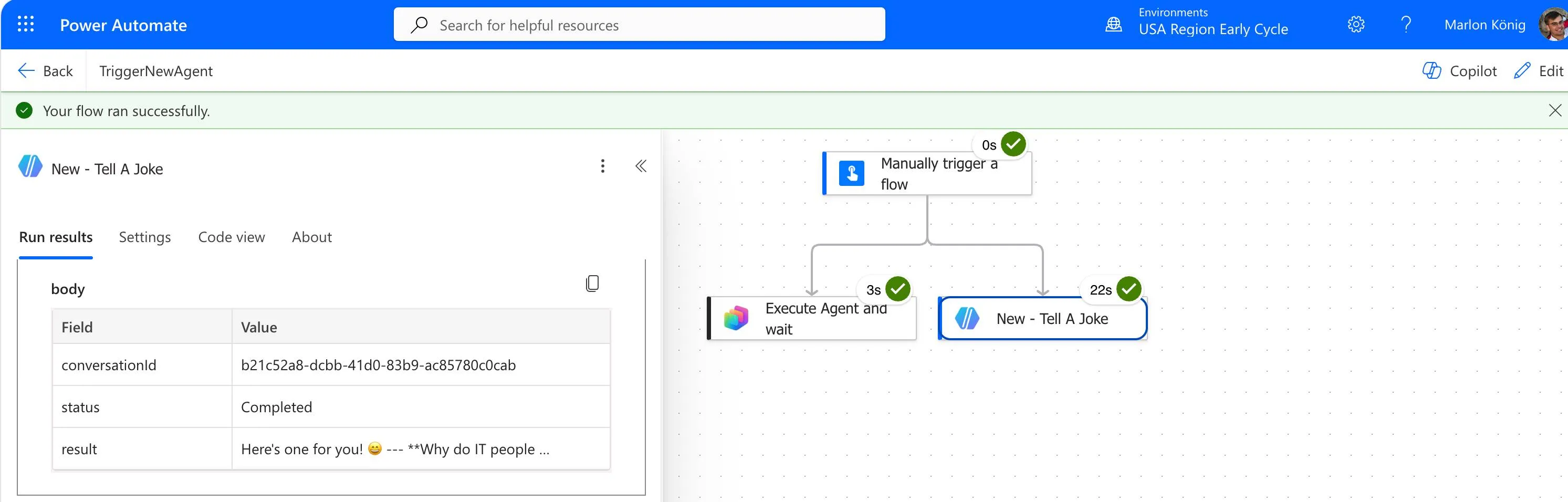
<p>The difference shows best when you hang both actions side by side in the same flow. Which is exactly what I did in the end: the classic “Execute Agent and wait” step on the left, the pasted agent action on the right, both pointed at the same New Experience agent.</p>
<figure><img src="https://marlon-koenig.com/_astro/power-automate-both-actions.mmQ3tlpo_Z1J4vT3.webp" alt="Power Automate flow &quot;TriggerNewAgent&quot; with two parallel branches under the trigger: &quot;Execute Agent and wait&quot; at 3 seconds and &quot;New - Tell A Joke&quot; at 22 seconds, both with a green check; on the left the run results of the second action showing status Completed and a joke as the result" /><figcaption>Both routes in parallel in the same flow. The pasted action returns a real answer, and you can see straight away that it takes considerably longer.</figcaption></figure>
<p>And there’s one more detail that ties neatly back to the JSON from before: the pasted action doesn’t return its result as <code>responses.0</code> but as <code>result</code>, alongside <code>status</code> and <code>conversationId</code>. That is exactly the <code>outcomeSchema</code> from the workflow builder JSON. So if you adopt this workaround, you have to point your downstream steps at different field names.</p>


<table><thead><tr><th></th><th>The classic way</th><th>My workaround</th></tr></thead><tbody><tr><td>Connector</td><td>Microsoft Copilot Studio</td><td>Agents</td></tr><tr><td>Action</td><td>Execute Agent and wait</td><td>agent action from the workflow builder</td></tr><tr><td>Agent from the New Experience</td><td><code>InvalidContent</code> in the response</td><td>runs</td></tr><tr><td>Findable in Power Automate</td><td>yes</td><td>no, only through copy/paste</td></tr><tr><td>Answer lives in</td><td><code>responses.0</code></td><td><code>result</code></td></tr><tr><td>Response time</td><td>around 8 seconds</td><td>20 to 40 seconds</td></tr></tbody></table>
<p>I should be honest about that last point, and it stings more than the table makes it look. The joke agent from earlier takes around 8 seconds through the Copilot Studio action. Through the Agents connector my runs landed between a good 20 and 40 seconds, 22 in the screenshot above for instance. That is three times as long at best, for an agent that does nothing but hand back a single sentence. No knowledge, no tools, no thinking.</p>
<p>Keep that in mind before you drop this workaround anywhere someone is waiting on the answer. In a nightly batch run, half a minute is irrelevant. In a flow hanging off a form or a chat, it very much is not. And if your flow loops over multiple records, it multiplies accordingly.</p>
<p>My assumption is that a fair bit of this is preview-state and that it will get faster. I can’t back that up though, that’s just my hope. At that point what mattered to me was that it ran at all.</p>
<h2>My takeaway and what I’m trying next</h2>
<p>That’s the workaround we’ve sort of settled on for now. It isn’t pretty, but it does the job. Long term Microsoft wants everyone to move to the workflow builder anyway. It’s just that I don’t want to migrate every workflow over right now, so I’ll take my time and watch how it develops.</p>
<p>What I’d find really cool is being able to migrate this automatically later on. Some kind of migrator that moves existing Power Automate flows into the workflow builder, that would be brilliant.</p>
<p>Something else is heading in that direction now: Microsoft has published its own Power Automate skills, <a href="https://github.com/microsoft/power-platform-skills/tree/main/plugins/power-automate" rel="noopener noreferrer" target="_blank">power-platform-skills on GitHub</a>. They let you build, edit, run and debug cloud flows straight from Claude Code or the GitHub Copilot CLI. There is a bundled MCP server doing the work underneath, and authentication goes through the Azure CLI.</p>
<p>To me that is the more interesting route, because you are no longer tied to one particular product, you just use whichever AI you already work with. Whether the skills can deal with the workflow builder or only with classic Power Automate I genuinely don’t know yet. I suspect the latter, but I’ll try it soon and write something about it.</p>
<p>One more thing: all of this is a snapshot that can change quickly. The New Experience isn’t GA yet, and I’d strongly expect Microsoft to fix this properly at some point. Until then, if you’re stuck in the same scenario, don’t waste too much time fighting the classic “Execute Agent and wait”, just try the route through the workflow builder. For me that was the difference.</p>
<p>And if you know a better way, please tell me. I’m curious.</p>
<h2>Resources</h2>
<ul>
<li><a href="https://github.com/marlonKoenig/blog-solutions/tree/main/copilot-studio-agent-power-automate" rel="noopener noreferrer" target="_blank">copilot-studio-agent-power-automate on GitHub</a> — the exported solution with the working flow and the agent (new experience), plus <a href="https://github.com/marlonKoenig/blog-solutions/blob/main/copilot-studio-agent-power-automate/new-agent-node.json" rel="noopener noreferrer" target="_blank">new-agent-node.json</a>, the JSON for the new agent node to paste straight into your flow.</li>
<li><a href="https://github.com/microsoft/power-platform-skills/tree/main/plugins/power-automate" rel="noopener noreferrer" target="_blank">power-platform-skills on GitHub</a> — Microsoft’s own Power Automate skills for building, editing, running and debugging cloud flows from Claude Code or the GitHub Copilot CLI.</li>
</ul>]]></content>
    <category term="Copilot Studio" />
    <category term="Power Automate" />
  </entry>
</feed>